
Wiki Table 2 JSON
Turn any Wikipedia table into clean, ready-to-use JSON.
Wikipedia is one of the largest sources of structured data on the web — but all of it lives locked inside HTML. Wiki Table 2 JSON hands you that data the way your code actually wants it: as clean, structured JSON, from a single API call.
No scraping. No HTML parsing. No API keys. Just point it at an article and get every table back, ready to use.
Why Wiki Table 2 JSON
- One simple endpoint. Point it at any Wikipedia article and get its tables back as JSON. That's the whole API.
- Zero setup. No sign-up, no keys, no rate-limit dance. Drop a URL in your browser, your script, or your app and you're done.
- Any language. Pull tables from any language edition of Wikipedia with a single
langparameter. - Built for messy, real-world tables. Merged cells —
colspanandrowspan— are expanded automatically, so every row stays aligned to the right columns. - Output your way. Choose
format=keyvalue(objects),format=matrix(lossless 2D arrays), orformat=csv— whatever your code wants. - Richer, cleaner data, opt-in. Pull the links inside each cell (
links=true), strip footnote markers like[254](cleanRefs=true), and turn"1,403"into a real number (parseNumbers=true). - Discover before you fetch.
meta=truelists every table's caption and dimensions, so you can grab the exact one you want. - Free and open source. MIT licensed and running on serverless infrastructure.
Quick start
Every request follows the same shape:
https://wikitable2json.vercel.app/api/{article}?table={index}&lang={lang}
Swap in a Wikipedia article title and you're parsing tables in one line of code.
See it in action
Take the most-followed accounts on Twitter's Wikipedia page:
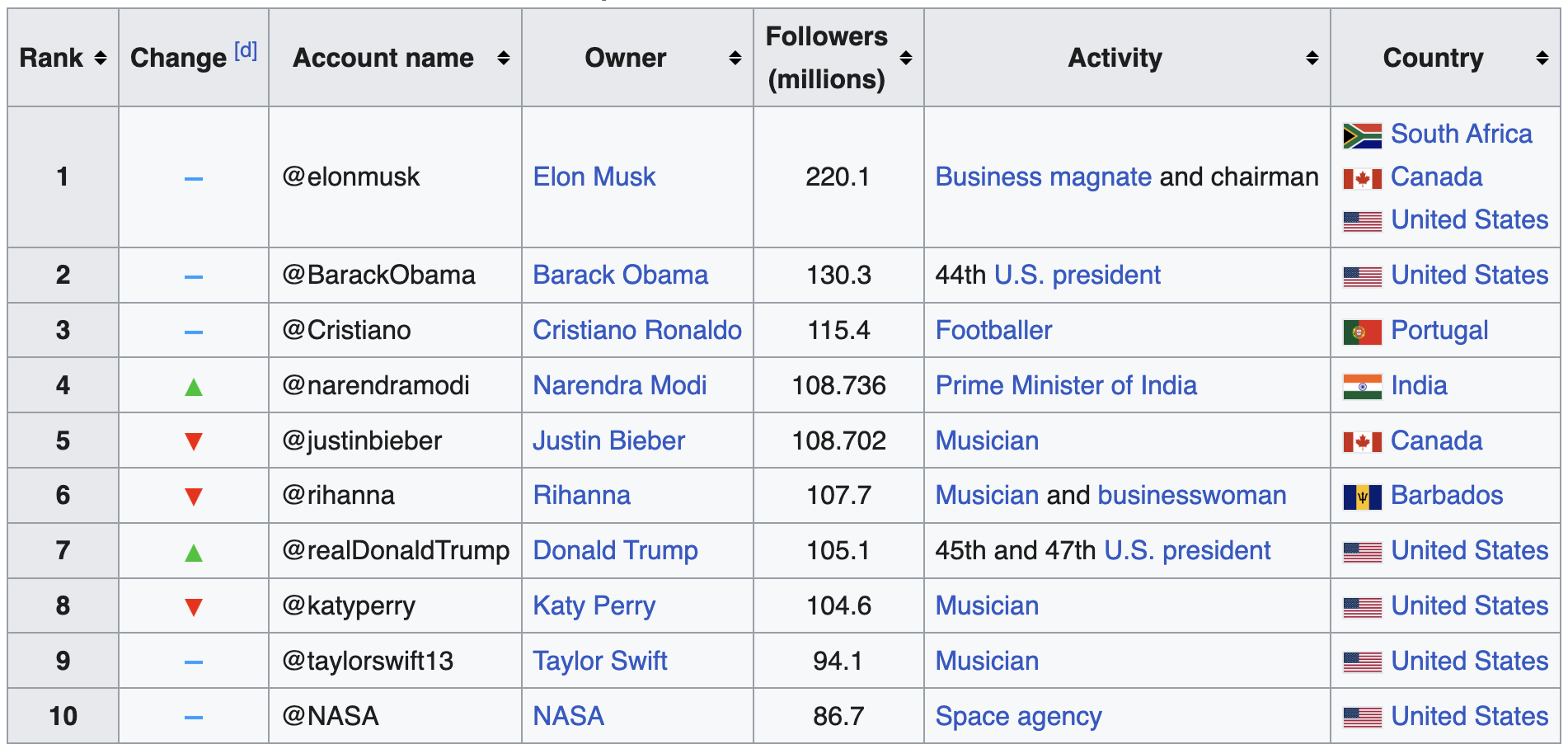
Request
https://wikitable2json.vercel.app/api/Twitter?table=0
Response
[
   {
      "Rank": "1",
      "Change": "",
      "Account name": "@elonmusk",
      "Owner": "Elon Musk",
      "Followers  (millions)": "220.1",
      "Activity": "Business magnate and chairman",
      "Country": "South Africa Canada United States"
   },
   {
      "Rank": "2",
      "Change": "",
      "Account name": "@BarackObama",
      "Owner": "Barack Obama",
      "Followers  (millions)": "130.3",
      "Activity": "44th U.S. president",
      "Country": "United States"
   },
   {
      "Rank": "3",
      "Change": "",
      "Account name": "@Cristiano",
      "Owner": "Cristiano Ronaldo",
      "Followers  (millions)": "115.4",
      "Activity": "Footballer",
      "Country": "Portugal"
   },
   {
      "Rank": "4",
      "Change": "",
      "Account name": "@narendramodi",
      "Owner": "Narendra Modi",
      "Followers  (millions)": "108.736",
      "Activity": "Prime Minister of India",
      "Country": "India"
   },
   {
      "Rank": "5",
      "Change": "",
      "Account name": "@justinbieber",
      "Owner": "Justin Bieber",
      "Followers  (millions)": "108.702",
      "Activity": "Musician",
      "Country": "Canada"
   },
   {
      "Rank": "6",
      "Change": "",
      "Account name": "@rihanna",
      "Owner": "Rihanna",
      "Followers  (millions)": "107.7",
      "Activity": "Musician and businesswoman",
      "Country": "Barbados"
   },
   {
      "Rank": "7",
      "Change": "",
      "Account name": "@realDonaldTrump",
      "Owner": "Donald Trump",
      "Followers  (millions)": "105.1",
      "Activity": "45th and 47th U.S. president",
      "Country": "United States"
   },
   {
      "Rank": "8",
      "Change": "",
      "Account name": "@katyperry",
      "Owner": "Katy Perry",
      "Followers  (millions)": "104.6",
      "Activity": "Musician",
      "Country": "United States"
   },
   {
      "Rank": "9",
      "Change": "",
      "Account name": "@taylorswift13",
      "Owner": "Taylor Swift",
      "Followers  (millions)": "94.1",
      "Activity": "Musician",
      "Country": "United States"
   },
   {
      "Rank": "10",
      "Change": "",
      "Account name": "@NASA",
      "Owner": "NASA",
      "Followers  (millions)": "86.7",
      "Activity": "Space agency",
      "Country": "United States"
   }
]
Parameters
table
Which table to return, by its index on the page. Omit it to get every table on the article. Default: all tables.
?table=0
lang
The Wikipedia language edition to read from.
Default: en.
?lang=de
format
Output shape: keyvalue (rows as { heading: value } objects), matrix (lossless 2D arrays, header row included — keeps every column even when headings repeat), or csv.
Default: keyvalue.
?format=matrix
?format=csv
links
Include the link targets found inside each cell. Cell values become { "value": ..., "links": ["https://en.wikipedia.org/wiki/…"] }. Ignored for csv.
Default: false.
?links=true
cleanRefs
Strip Wikipedia footnote markers like [254] from cell values (column headings are always cleaned).
Default: false.
?cleanRefs=true
parseNumbers
Coerce purely numeric values to numbers — handles thousands separators (1,403 → 1403) and the Unicode minus (−67 → -67).
Default: false.
?parseNumbers=true
meta
Return a lightweight description of each table — { index, caption, rows, columns } — instead of its data. Handy for discovering which table index you want.
Default: false.
?meta=true
Acknowledgements
Wiki Table 2 JSON was inspired by wikitable2json.com, an open-source project written in Go. I wanted a different response shape for my own work, so I built this lightweight take on the same idea — with thanks to the original for the spark.
License
MIT